Waymo Label Requesting Redesign
Redesigning how ML engineers request human-labeled data at Waymo — collapsing a sprawling, tribal-knowledge process into a guided multi-step form that doesn't need a labeling engineer on call.
Note: These screens are my own redesigns. Copy, labels, and advanced settings were rewritten or invented to protect Waymo's confidential information — some deliberately unrelated to the real tool.
The problem
A hand-held process that stopped scaling as Waymo grew.
Human-labeled data powers self-driving: it's how what the car sees becomes something a model can learn from. Labels range from 2D bounding boxes to timestamps to open questions about a run — and every new label type starts with an ML engineer explaining to a group of labelers exactly what they need and how to do it.
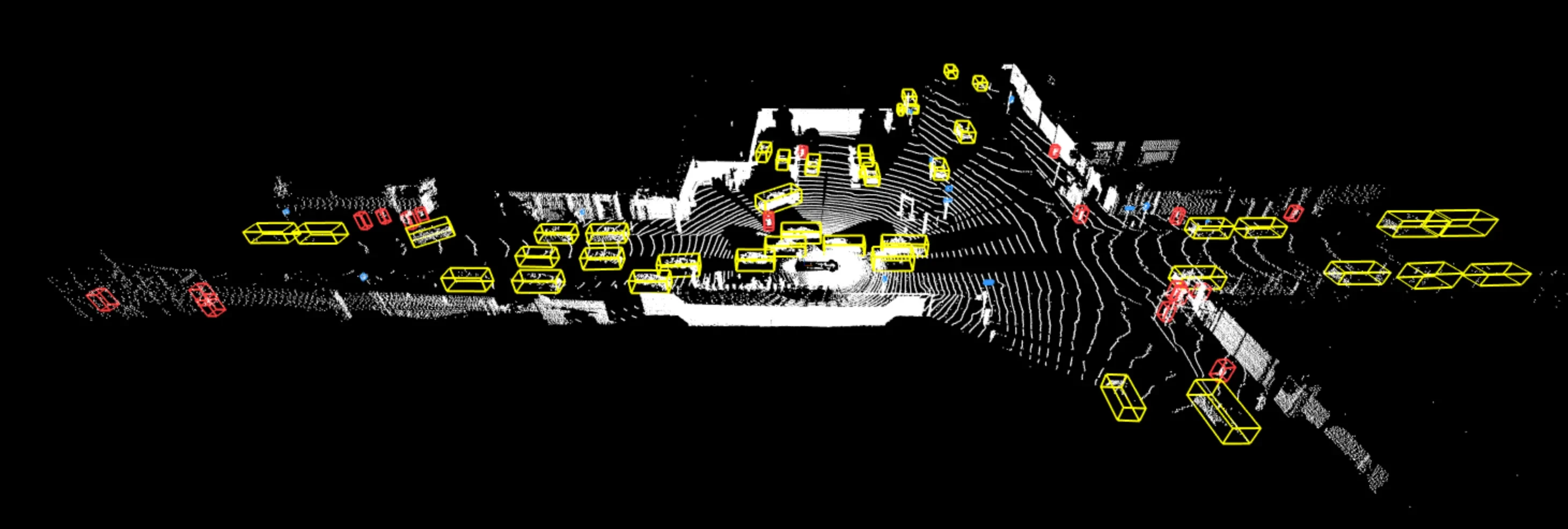
Image © Waymo — Waymo Open Dataset. Source: medium.com/waymo
Historically, the labeling team hand-held every ML engineer through most of their labeling requests. New labeling requests often required new detailed policies that were explained through layers of documentation, new protos for new attributes, and a back-and-forth with the labeling team to understand what needed to be defined and why.
That worked when the company was small. As Waymo grew, it became a bottleneck with a labeling engineer required every time someone needed something new.
Research
Cognitive walkthroughs, a heuristic evaluation, and interviews.
I worked on several different forms of research to understand the current process and its pain points:
- Cognitive walkthroughs: I simulated a brand-new ML engineer and an experienced user each creating a new labeling request with custom fields, and jotted down every point of confusion, every question, and every place where the user had to leave the flow to look up information.
- Heuristic evaluation of the existing workflow against Nielsen’s 10 usability heuristics.
- User interviews with both experienced and newer members of ML engineering teams to understand their common workflows, pain points, and where they needed help.
Key insights
Too many ways in, an internal vocabulary, and advanced settings standing between people and the one or two fields they came to change.
Charting the current process revealed the first problem before any interview did. Documentation pointed to several possible starting points, and each of those led to a different path through the request process. Multiple entry points, redundant documentation, internal vocabulary, and required steps that only applied to advanced users made the process painful for new users.
- I need labels!
- First time?
- Read the labeling process docs
- Basic request?
- Use the Easy Labeling form
- Read the docs on the Easy Labeling form
- Fill out the Google Form
- Have a labeling policy?
- File a Labeling Policy bug
- The form creates a new bug
- Share data links
- Monitor progress in the bug
- Finish!
At any point
Confused? Ask someone on the Labeling team. Every box above had an unofficial fallback of finding the right person and having them explain it, which is how most requests actually got made.
- Start / end
- Decision
- Action
- Documentation
The interviews turned up the finding that shaped everything after it. Most people weren't filing new requests at all. They wanted an existing request with one or two things changed — a different attribute, an extra question, a wider range. But the only route to those two fields ran through the entire form, and the form was long enough and opaque enough that they gave up and asked an engineer to make the change for them. The bottleneck wasn't the hard requests. It was the easy ones arriving through the same door.
Most requests weren't new. They were an existing request with one or two fields changed — and the form was too long to make that change without help.
From there I inventoried every piece of information a request actually needs, grouped the related settings, and separated what users change constantly from the advanced settings they touch infrequently.
I pulled documentation out of several sources and added clearer guidance within the interface itself, so users could learn the vocabulary and understand the options without leaving the flow.
The first version
I scoped it to a few pages. The real requests didn't fit.
Coming out of research I thought the answer was compression. Take the sprawling form, keep the handful of fields most people actually touch, hide the rest, and land the whole thing in a few pages. It was easy to draw and easy to argue for.
It didn't survive contact with the real requests. Most of them weren't simple — they were somewhat complicated, each carrying a few advanced settings that mattered enormously to the person filing and a different few every time. A three-page form would have demoed beautifully and failed the actual job, sending exactly the same people back to an engineer for exactly the same reason.
So the form had to grow rather than shrink, which meant the number I'd been optimizing was the wrong one. Total length was never what made the old form unusable. What made it unusable was how much you had to hold in your head at once, and how far you had to get before you were allowed to stop.
The redesign
One hub, one wizard, and documentation moved into the interface.
I redesigned the request flow as a wizard. I grouped related settings into steps, promoted documentation from tooltips into the interface itself, and tucked advanced settings behind toggles.
The constraint I couldn't design around: the full set of ways to tune a labeling project cannot become an easy guided wizard. There are too many options, and each matters to somebody. So the wizard only makes the easy case possible, and finding out what counted as easy was grunt work — reading through past requests and talking to the people who filed them. The cost is that hard cases still go to the long form.
Components of the redesign:
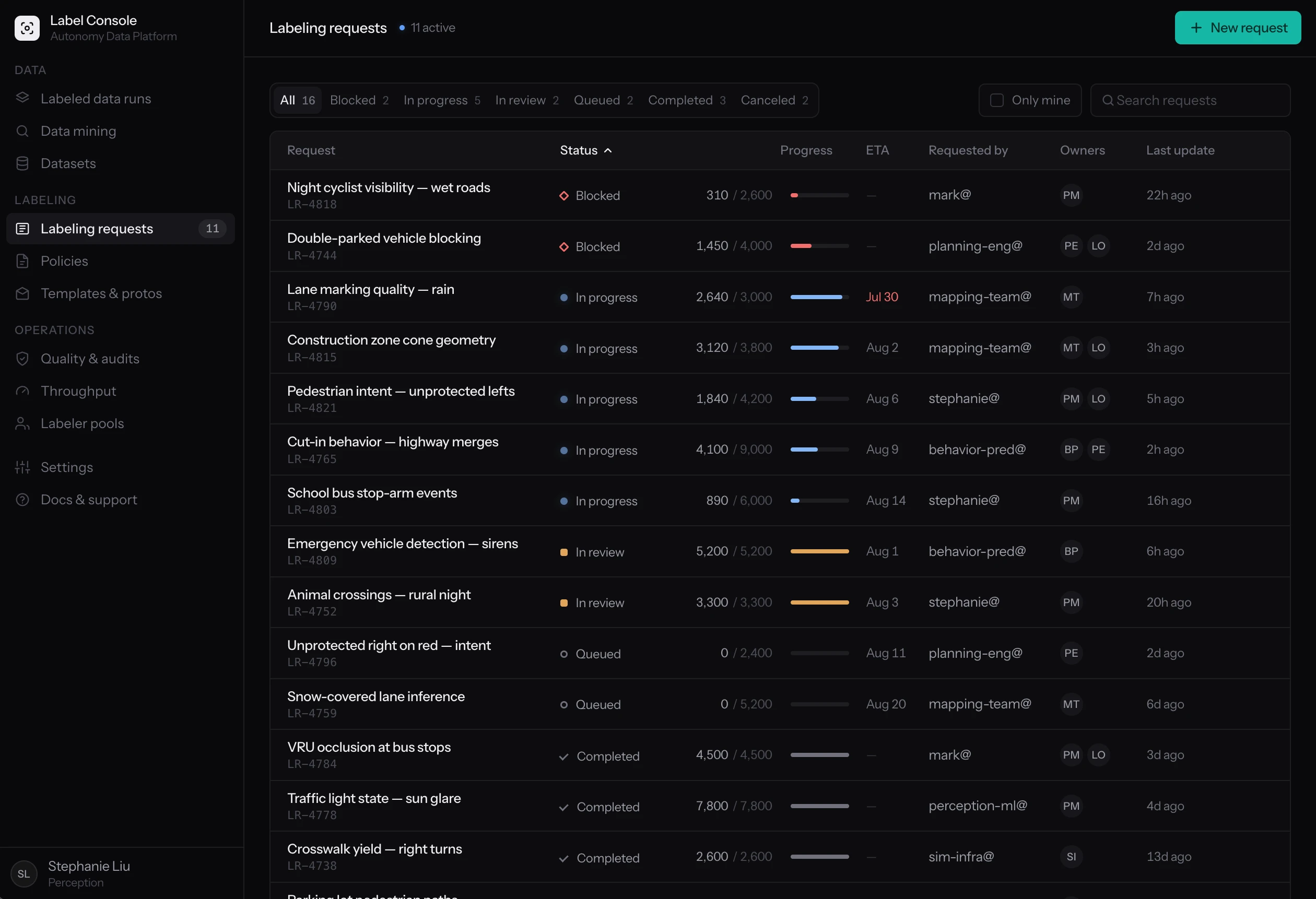
- A central hub for creating labeling requests and tracking their progress
- A guided wizard with clear in-context instruction and hidden advanced settings
- Streamlined continuous and one-time data importing
Pass one — a wizard instead of a wall
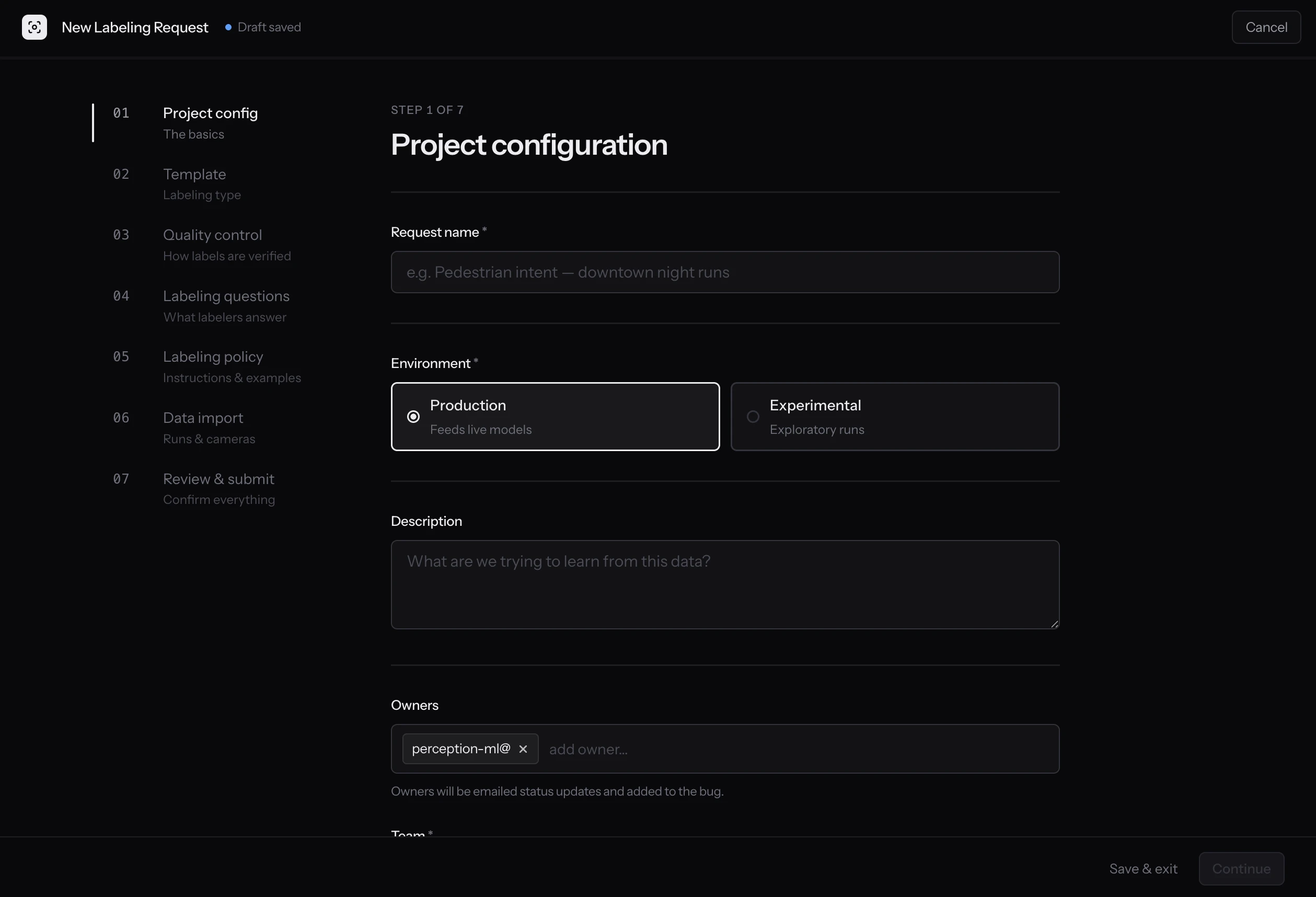
The new wizard breaks up a long process into saveable, manageable steps, and hides advanced features unless needed.
Pass two — documentation where the decision is
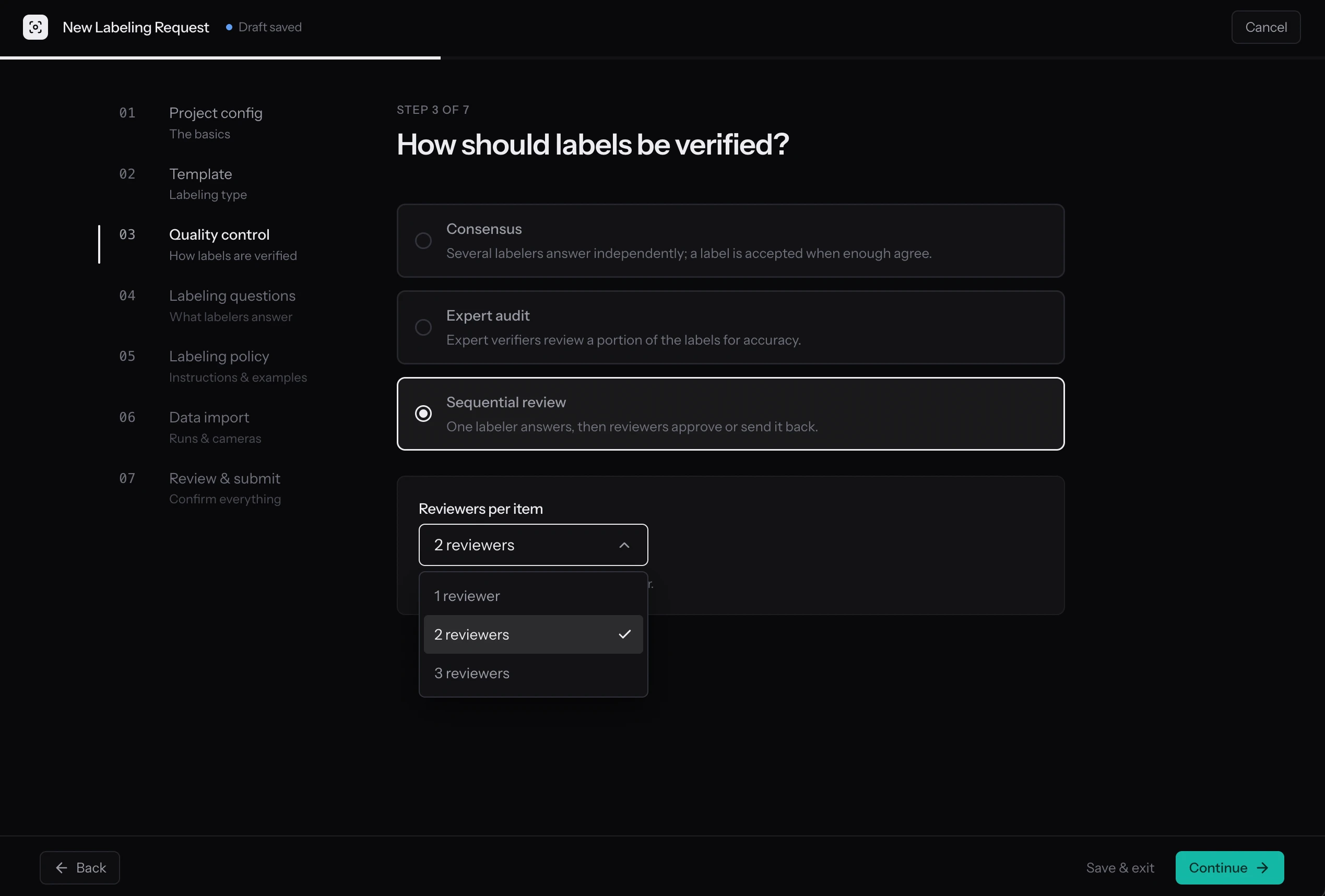
The redesigned quality-control step uses plain-language documentation for each method.
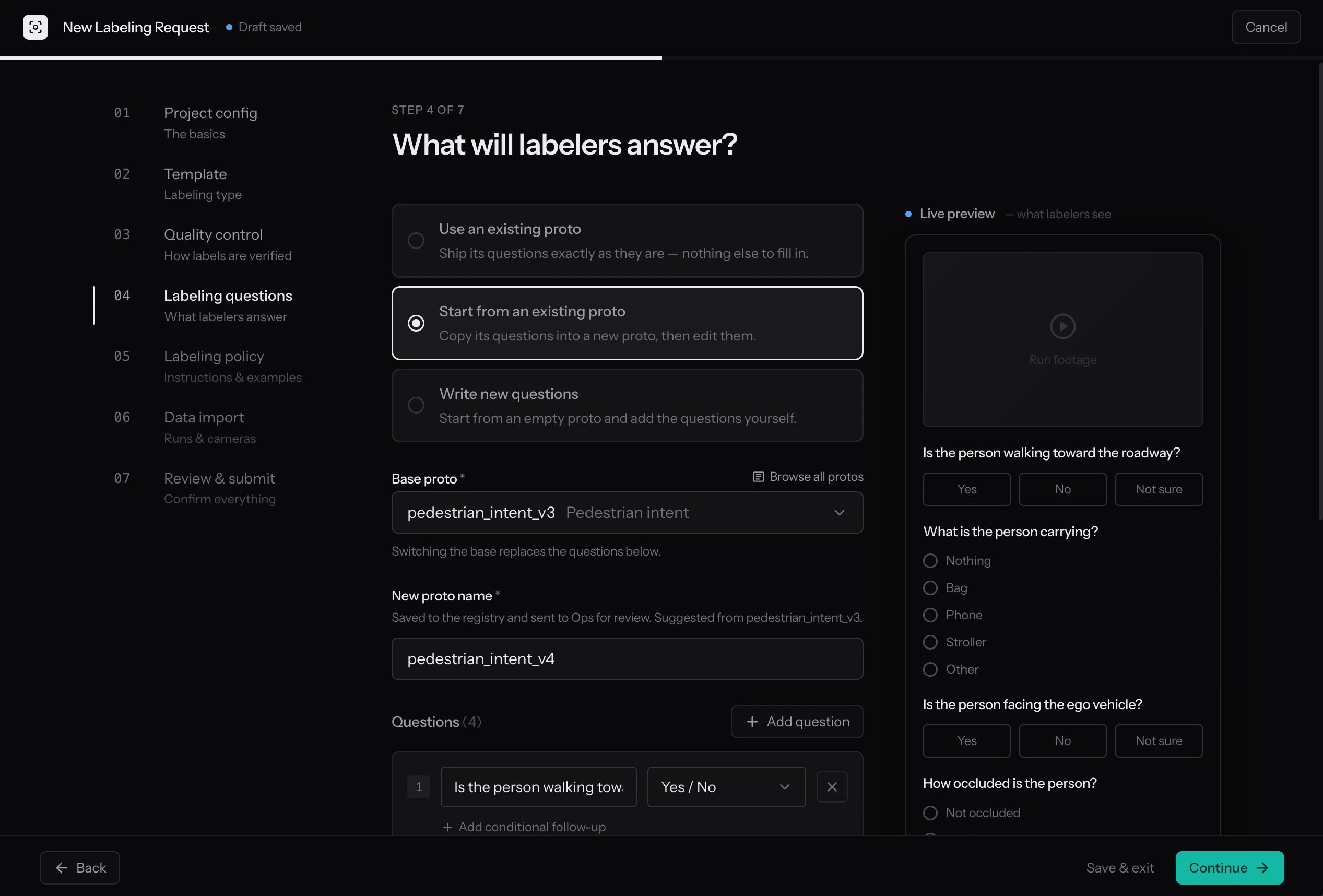
A new section configures labeling questions right in the labeling request flow, and shows a preview of what the labeler will see.
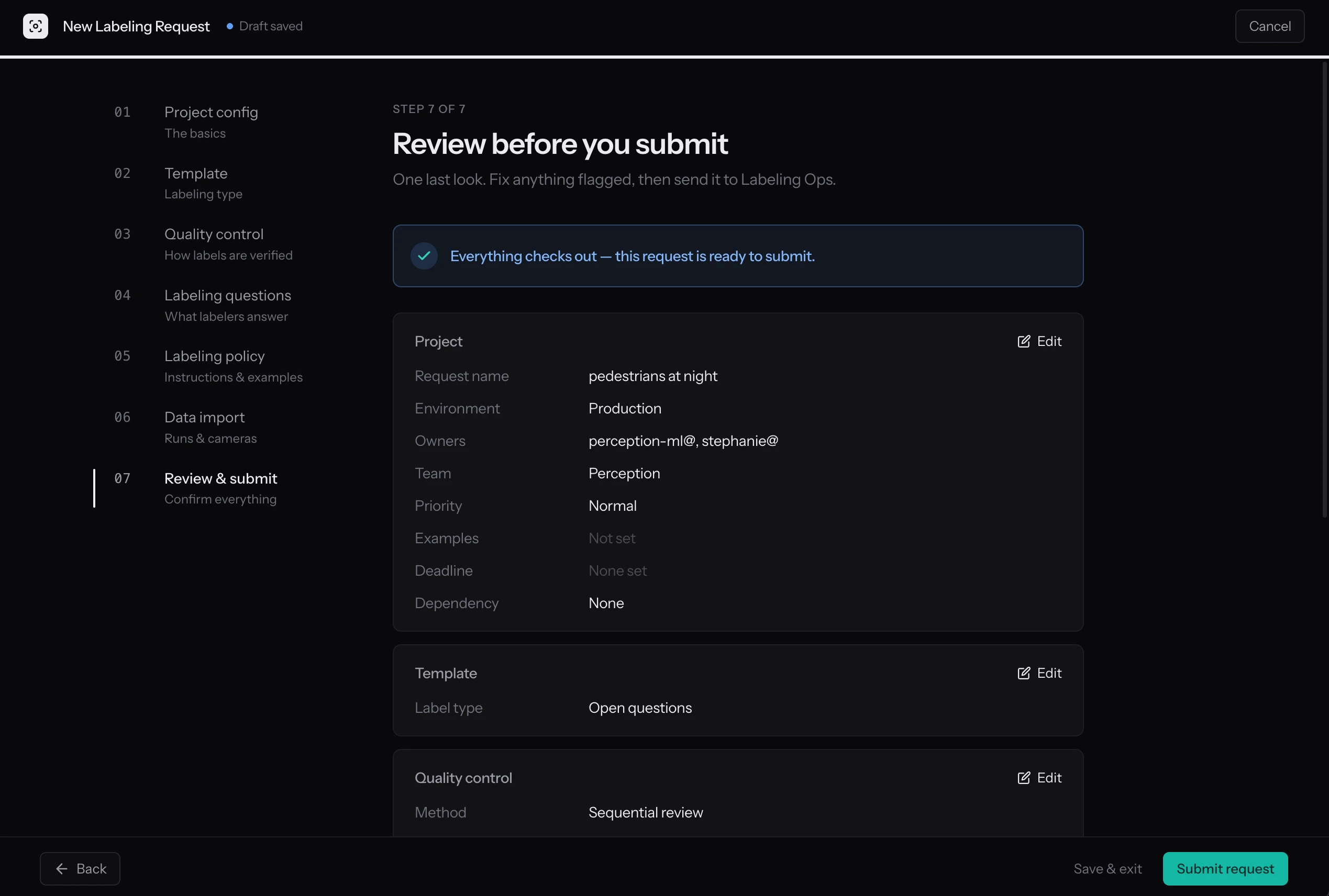
Pass three — review, then track
A review step provides feedback before saving.
The new dashboard for tracking labeling requests, instead of using the overloaded bug tracker.
What the work established
One way in, documentation where the decisions are, and a form that admits what it can't do.
- One way in. A central place for creating and tracking requests, instead of several documented entry points that each led somewhere different.
- Documentation as interface. Explanations moved out of tooltips and out of documentation and into the moments where users make decisions, so the form teaches the vocabulary it uses.
- Progressive disclosure. Gathered research data about what was commonly used and what wasn’t, and tucked advanced settings behind toggles so users only see what they need.
The intended effect: ML engineers who can make and track their own requests, and labeling engineers who get their time back.
How I built it
A framework-free prototype, factored for whoever rebuilds it.
The prototype is plain HTML, CSS, and JavaScript, with no framework and no build step, so it opens straight from a file. Each screen keeps one state object and a render function that re-derives the DOM from it, with a small keyed reconciler doing the job a framework normally would.
The trade-off was writing those framework pieces by hand. In return, the files are split along the component boundaries an engineer would draw when rebuilding it in a real codebase: one file per wizard step, one for state, one for design tokens.
Takeaways
Two years on I'd keep the wizard, and move the line it draws.
Two years on, most of this still holds. The core move — copy an existing attribute list, change a few fields, add your questions — is still how the majority of requests should start, because it's still true that most requests are edits of something that already worked rather than something new.
What I'd add now is the part the wizard deliberately refused. The hard cases still go to the long form and the labeling engineer, and I accepted that boundary as the price of making the easy case easy. A small chat assistant living inside the flow could take most of it: pull the relevant documentation into the moment it's actually needed, explain what an advanced setting does in the requester's own terms, and toggle the fields they can't find on their own.
The wizard handles the barebones case. An assistant could handle the next ten percent — the somewhat-complicated requests that currently bounce to an engineer for no better reason than that nobody can explain the form. That doesn't remove the labeling engineer from the loop. It moves the line, and leaves them the cases that genuinely need their judgment.